An AI story generator audiobook workflow closes the gap between imagining a story and hearing it performed. In MyNarratorAI, you can describe the story you want, guide its beginning and ending, choose English or Spanish, select a narrator, and send the completed story directly into the audiobook pipeline. You do not need to draft a separate manuscript and upload it later.
The useful part is not simply generating more text. It is deciding which details you want to control and which ones you want the AI to propose. MyNarratorAI keeps those choices in one creation form, so your premise, mood, character direction, narration, and optional enhancements start from the same brief.
How the AI story generator audiobook workflow works
The process has three broad stages: define the story, review the setup, and generate the book. MyNarratorAI first uses your form choices to build a story structure. It then expands that structure into the chapter plan available for your selected story length, writes the story, and packages the result as an EPUB. The completed EPUB enters the same audiobook-processing workflow used for uploaded books.
That final handoff matters. The text is not left in a chat window for you to copy and reformat. It becomes a book in your MyNarratorAI library, where the platform can prepare narration and character dialogue for audio. For a closer look at that downstream process, read How an AI audiobook generator creates full-cast audio.
1. Choose English or Spanish before choosing a voice
Start with Story Language. The current story creator supports English and Spanish, and your selection filters the narrator roster to voices compatible with that language. Choose the language in which you want the story written and performed; it is a production setting, not merely the language of the interface.
Next, review the current narrator and use Change Narrator if you want a different voice. This selection establishes the narration voice for the resulting book. The audiobook pipeline can then identify character dialogue and prepare the broader cast from compatible voices. If you want to bring an authorized voice of your own into future projects, see the guide to creating custom voice actors.
2. Write a strong Story Basics prompt
The Story Prompt is the clearest place to state the core idea. A practical prompt names the protagonist, their immediate problem, the setting, and the kind of change or decision the story should explore. For example, you might request a mystery about a night-shift archivist who discovers that one catalogued recording has not happened yet.
You do not need to prescribe every event. Add only the details you care about, then let the story generator fill the open space. The form treats your non-empty story fields as instructions to preserve, while blank fields can be proposed by the AI.
Use the preview when you want a collaborative first pass
Let AI fill this (preview & edit) drafts the story structure before full generation. It can propose details such as a title, premise, audience, genres, moods, and character direction. Those results are written back into editable fields, so you can revise them rather than accepting an opaque plan. Keeping a field preserves it; clearing a filled field asks the system to decide it again when you generate.
This is a useful checkpoint for catching a premise that is too broad, a mood that does not fit, or a title that reveals too much. It is still generative software, so review the structure as a creative draft rather than a guarantee of perfect interpretation.
3. Direct the beginning, ending, and character arc
The Story Flow controls are for decisions that should not be left to chance:
- How the story starts can establish the opening situation or first image.
- How the story ends can pin the destination without scripting every step toward it.
- Time Span tells the story whether events unfold over one evening, a season, or many years.
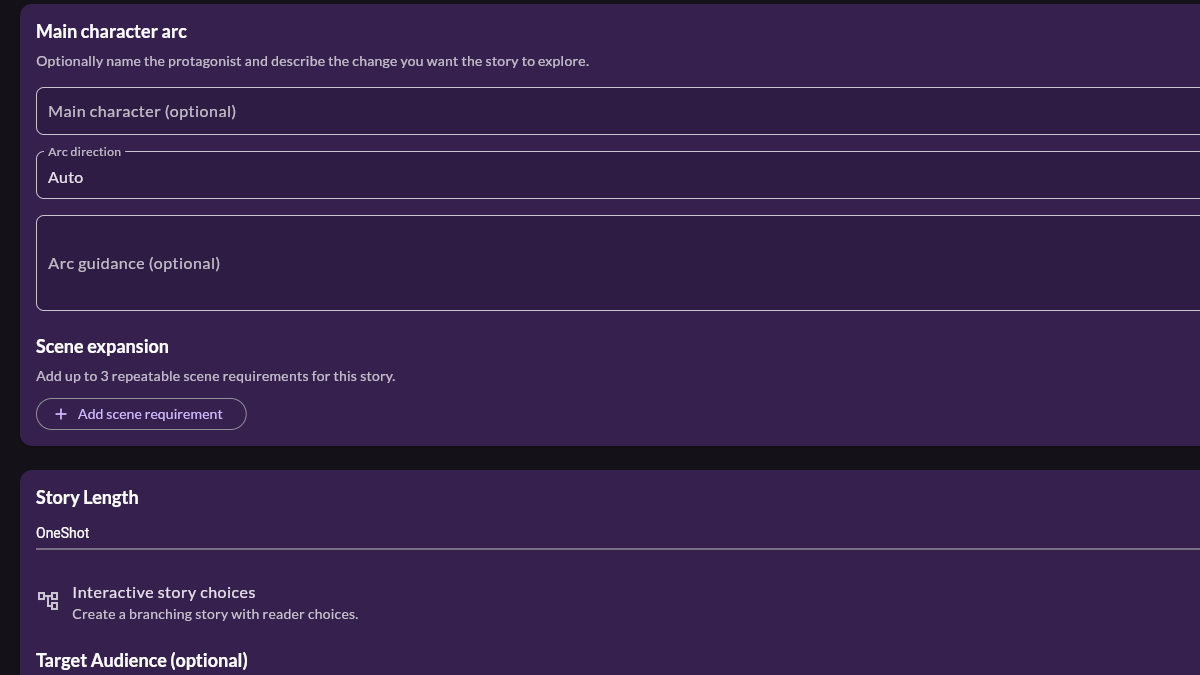
You can also name the main character and choose the intended direction of their arc, with space for your own guidance. Story Characteristics add another layer: author feelings, tags, genres, and moods help describe the reading experience you want. Target Audience and Writing Style further shape how the story is told.
Select a story length from the options available to your account. A focused idea often benefits from a shorter format; a premise with several turning points needs more chapter space. The available lengths and optional controls are governed by current feature access, so use what the creator displays rather than assuming every account has the same menu.
4. Add optional media deliberately
If your feature access includes them, AI Enhancements can control character images, scene images, sound effects, and music. Each visible control offers frequency choices from none to more frequent use. These are optional layers, not requirements for creating the story or audiobook.
Start conservatively. Images can help listeners follow a character or setting in the visual player, while carefully placed effects or music can strengthen a scene transition. More media is not automatically more immersive. Match the frequency to the story, and leave a category set to none when the prose and performance should carry the moment.
5. Generate, listen, and review the result
When the setup reflects your intent, select Generate Story. MyNarratorAI builds the story, creates its book artifact, and moves it into audiobook creation. Generation and audio rendering take time because the system is producing a structured book and audio assets, not returning a single chat response.
Listen to the finished result with the same care you would give a human first edit. Check character names, dialogue handoffs, pacing, and pronunciation. AI can reduce the mechanical work between idea and audiobook, but you remain the editor who decides whether the story and performance are ready to share.
Use prompts and source material you created or have permission to adapt. Avoid asking the system to reproduce a living author’s work or copyrighted characters you do not control. If you plan to distribute the audiobook, confirm that you have the necessary rights to its text, voices, and any uploaded reference material.
Ready to move from an idea to something you can hear? Start an AI story generator audiobook in MyNarratorAI with a short, specific story brief.
Related Articles
- AI Audiobook Generator: Turn Any Book Into Full-Cast Audio
- Create Custom Voice Actors for Full-Cast AI Audiobooks
- EPUB to Audio: Complete Conversion Guide
Published on August 23, 2026.