Custom voice actors give an audiobook creator another option beyond the built-in voice library: a reusable, account-linked voice based on a recording that the creator has permission to use. In MyNarratorAI, you can upload short samples, describe the voice with a few required fields, listen to generated speech, and use an eligible voice in a full-cast audiobook. This guide explains what the feature currently does, what it does not promise, and how to prepare a useful source sample.
When the feature is enabled for your account, open MyNarratorAI custom voice actors to create and manage your voices. Access is checked by the app and API, so the creation page may not be available for every account or at every point in a rollout.
How custom voice actors work in MyNarratorAI
MyNarratorAI does not turn an upload into a downloadable voice model. It stores the permitted source samples with a voice-actor record and uses an uploaded sample as the reference when the text-to-speech system renders that voice. One sample must be marked as the main sample. That main upload is also the source used when MyNarratorAI creates the narrator’s generated demo clips.
The uploaded source and the generated demo have different jobs. The source is the recording used as the voice reference. The demo is newly generated speech that lets you hear a result from a configured production engine. A demo is not a replacement source, and its presence is not an automatic quality certification.
A user-created voice is tied to its creator. Other regular users cannot select a private custom narrator unless it has explicitly been shared. Language, accent compatibility, availability, ownership, and other voice-selection checks still apply whenever an audiobook is created or regenerated.
How to create a custom voice actor
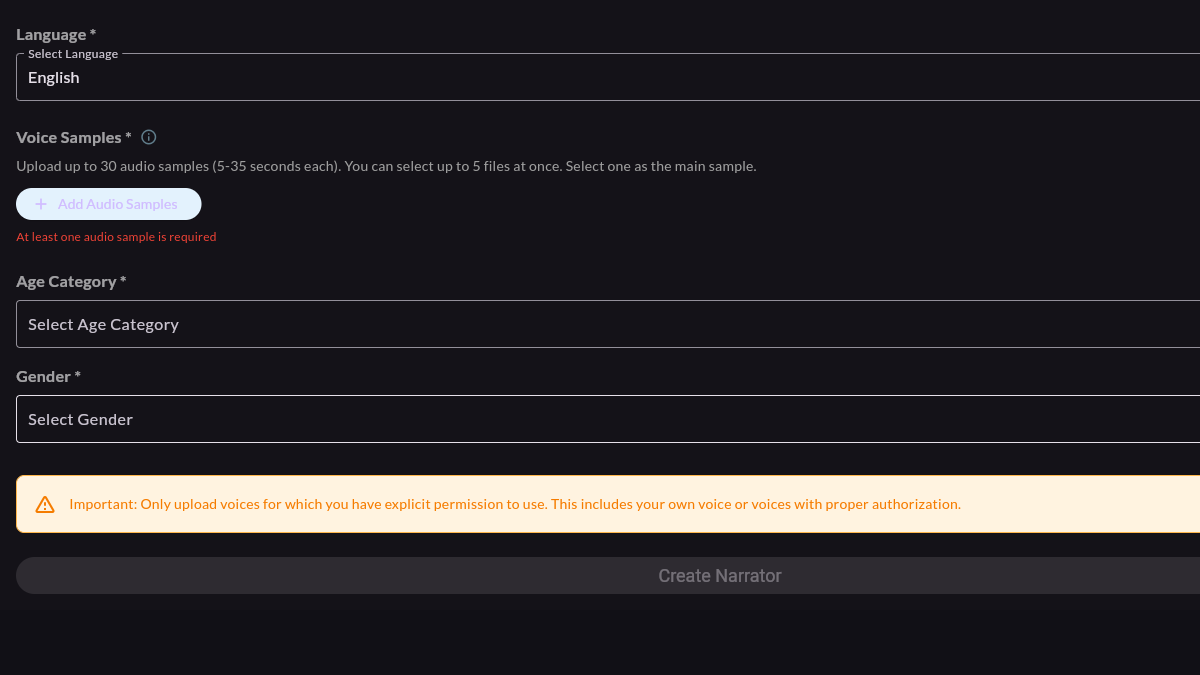
- Confirm that you may use the voice. Upload your own voice or a voice for which you have explicit permission. The creation form displays a warning about this requirement; it is not merely a recording tip.
- Choose the language. The current form offers English and Spanish. This setting is part of the voice’s metadata and helps keep the voice within compatible audiobook selections.
- Add voice samples. You can keep up to 30 samples on a custom narrator. The creation screen asks for samples from 5 to 35 seconds each and lets you choose up to five files in one upload action. At least one sample is required.
- Select the main sample. Exactly one upload is the main reference. Pick the take that best represents the voice you want the generated demo and main-sample requests to use.
- Set age and gender metadata. The age choices are kid, teenager, young adult, adult, and old; the gender choices in the current form are male and female. These are creator-selected fields, not claims that the platform independently verified the speaker’s identity.
- Test and create. The sample controls can generate speech for listening before or after creation. After you submit the form, demo processing may continue asynchronously, so a preview may not be ready immediately.
Choose source audio without inventing hard recording rules
The form’s duration range is a product limit, not a promise that every recording inside that range will sound the same. A practical source is one in which the intended speaker is easy to hear. Background music, another speaker, heavy room noise, or strong effects can become part of what the text-to-speech engine receives as its reference. The interface points to an optional voice-isolation tool, but it does not require a studio microphone or a particular recording device.
More uploads are optional. They are useful when you have meaningfully different takes rather than many copies of the same recording. Each sample can carry emotion, speed, and loudness labels, along with pitch-transpose and volume adjustments. You can test individual samples, change which one is main, add or delete samples, and regenerate the demo. The most reliable decision is still to listen to the generated speech and judge whether it suits the intended character or narrator.
Use a custom voice in a full-cast AI audiobook
Full-cast rendering assigns speech to a narrator and to eligible character voices. A custom narrator becomes part of the creator’s available voice inventory when it passes the same ownership, language, accent, enabled-state, and serviceability checks as other selectable voices. The voice-assignment system can consider creator-owned voices that match the character metadata, and compatible voices can also be chosen directly through character voice controls where those version controls are available.
This makes a stored custom narrator useful in more than one compatible project without promising that every character will receive it automatically. You can select the same stored voice again when you want continuity, but the actual assignment is recorded per audiobook version and remains subject to the book’s settings. MyNarratorAI also keeps narrator and character roles separate so descriptive narration does not have to use the same voice as dialogue.
What happens after you press Create
MyNarratorAI saves the uploaded samples, creates the custom narrator, and starts generated-demo work for the configured production text-to-speech engines. Which preview the app shows is rollout-controlled. A generated preview may remain unavailable while processing is pending or if generation fails.
This processing is different from the broad automated quality-assurance claims sometimes made about voice cloning. MyNarratorAI provides sample testing, generated previews, editable sample settings, and regeneration controls. It does not guarantee that every upload will reproduce a voice perfectly, remove noise automatically, or pass a universal naturalness score. Listen before assigning the voice to a long project, and adjust the source or sample settings when the result does not fit.
Start with a voice you are allowed to use
The essential workflow is simple: choose a permitted recording, stay within the form’s sample limits, mark one clear main sample, enter accurate metadata, and listen to generated speech. If custom narrator creation is available for your account, visit My Narrators to create a voice, then use compatible narrator or character controls when building your audiobook.
Related Articles
- AI Audiobook Generator: Turn Any Book Into Full-Cast Audio
- EPUB to Audio: Complete Conversion Guide
- How to Convert eBooks to Audiobooks With AI
Originally published March 8, 2026; updated August 23, 2026.