Public domain audiobooks offer two useful ways to enjoy classic books: listen to an existing recording, or start with a public-domain ebook and create a new audiobook. The right path depends on whether you want something ready to play or a narration built from a source book you select.
MyNarratorAI supports the second path through its public domain audiobooks library. After signing in, you can browse classic books, inspect the available edition, and send your selection into the standard audiobook-creation flow. This guide explains that current workflow and also points to established sources for ready-made recordings and source ebooks.
Where to Find Public Domain Audiobooks
Before choosing a website, decide what you actually need. An audiobook catalog gives you audio that has already been recorded. An ebook library gives you source text that you can read, download in an available format, or use to create a new narration when the work and edition are suitable for that use.
LibriVox for ready-made volunteer recordings
LibriVox is the most direct option in this list when you want an audiobook that is already narrated. Volunteers record books that LibriVox treats as public domain under its U.S.-based policy, and listeners can browse the catalog by author, title, genre or subject, and language. Because the recordings come from different volunteers, a book may be a solo reading or a collaborative project.
LibriVox also explains that its U.S. public-domain determination does not automatically settle a work’s status everywhere. Check its public-domain information and verify the particular work in the country where you will access or use it.
Project Gutenberg and Standard Ebooks for source books
Project Gutenberg is useful when you need a downloadable ebook rather than a finished recording. Its catalog focuses on older works screened under U.S. copyright rules, and individual book pages provide the available reading and download formats. Project Gutenberg’s own terms advise readers outside the United States to check the rules that apply where they live.
Standard Ebooks produces carefully formatted editions of works it believes are in the U.S. public domain. It is a helpful source when edition quality, typography, metadata, and semantic ebook structure matter to you. MyNarratorAI’s in-app information page credits Project Gutenberg and Standard Ebooks as sources behind much of its public collection.
MyNarratorAI for creating a new narration
MyNarratorAI’s public-domain library is designed as a starting point for audiobook creation. Its deployed library page includes Books, Collections, and Authors tabs. Search follows the active tab, so you can look for a title on Books, a subject grouping on Collections, or a writer on Authors.
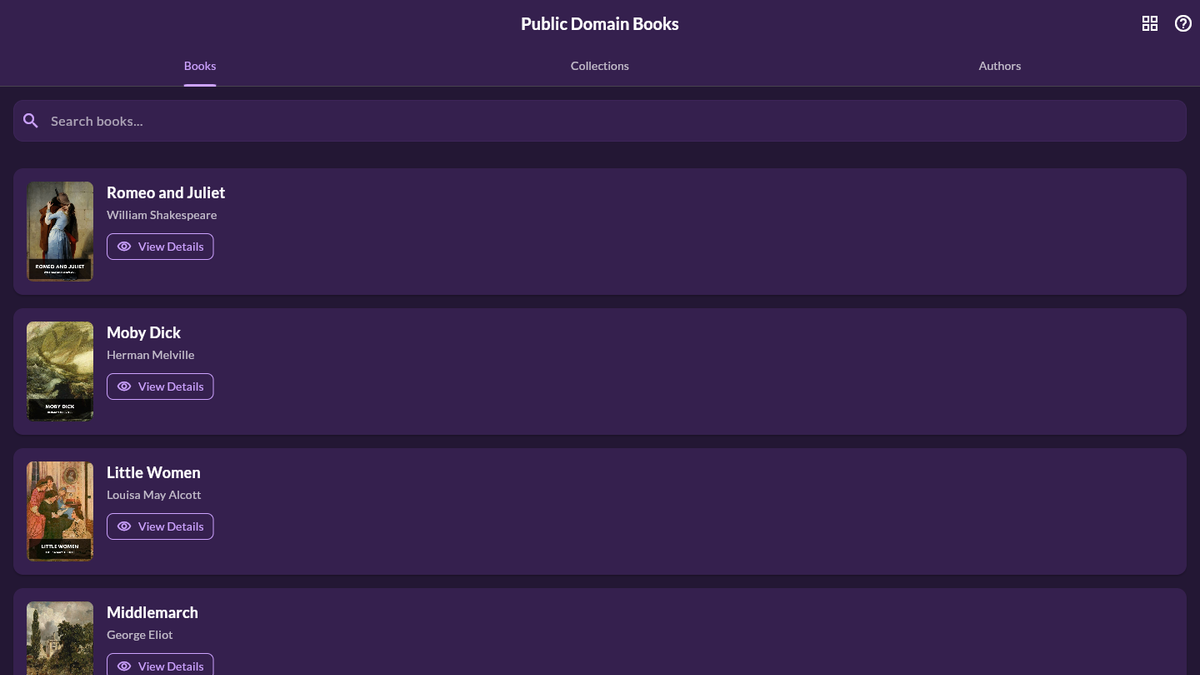
The visible book cards include a View Details action. That opens a dedicated page for the selected book rather than immediately starting creation, giving you a chance to review the catalog information first.
How to Create an Audiobook From the MyNarratorAI Library
- Open the library. Sign in to MyNarratorAI and visit the Public Domain Books page from the Library area.
- Choose how to browse. Use the Books, Collections, or Authors tab. Enter a search term if you already know the title, grouping, or writer you want.
- Review the book details. Select View Details. The current details page can show the title, author, language, publication information, collection, and cover associated with the catalog entry.
- Confirm the exact work and edition. Check the source information and any rights notice that applies to the file. Do this even when the underlying story is widely described as a classic.
- Start creation. Select Create Audiobook From This Book. MyNarratorAI carries the selected source into the Create Audiobook page and prefills its known title and author information.
- Review the creation settings. Choose from the voice-assignment and narrator settings shown on the creation form, then select Create Audiobook when the form matches what you want.
This path avoids downloading a catalog file and uploading it again. It also keeps the selected source book attached to the creation flow, which reduces the chance of accidentally starting with a different edition.
Check Public-Domain Status for Your Jurisdiction
“Public domain” is not a universal label that applies identically in every country. A source may screen works under U.S. rules while your location applies a different term or other conditions. The status of a famous story also does not necessarily answer every question about the exact edition, translation, introduction, illustration, or file you plan to use.
This article is general product information, not legal advice. Before downloading, adapting, distributing, or creating audio from a work, verify the status of the exact material in your jurisdiction. Read the source site’s rights or license notice and seek qualified local guidance when your intended use requires more certainty.
Should You Listen to an Existing Recording or Create One?
Choose an existing recording when your priority is to begin listening immediately and the available narration suits you. LibriVox is built for that task. Choose a source ebook when you want to create a different listening version from a specific book or edition. Project Gutenberg and Standard Ebooks help with source discovery, while MyNarratorAI provides a searchable in-app route from a catalog entry to audiobook creation.
If you want to try the creation path, browse public domain books in MyNarratorAI, open a title’s details, verify that the exact source is appropriate for your location and intended use, and continue with the supported creation settings.
Related Articles
- AI Audiobook Generator: Turn Any Book Into Full-Cast Audio
- EPUB to Audio: Complete Conversion Guide
- How to Convert eBooks to Audiobooks With AI
Originally published July 4, 2025; updated August 23, 2026.