If a generated chapter says a name incorrectly or gives a line to the wrong character, you should not have to rebuild every creative choice from scratch. When Create Version is available to your account, MyNarratorAI lets you fix an AI audiobook with targeted pronunciation, dialogue, character, or voice changes.
The important word is version. A correction does not destructively patch a few milliseconds inside the old audio. It records the changes, keeps the original version available, and regenerates the selected chapter range. Within those chapters, unchanged audio chunks can be reused when possible.
Here is how to diagnose the problem, choose the smallest appropriate control, and review the result.
First, identify what is actually wrong
Similar-sounding problems can require different fixes. Before changing a setting, listen to the line in context and classify it:
- Pronunciation: the correct voice says a name or term incorrectly.
- Dialogue assignment: the words are right, but the wrong character speaks them.
- Voice casting: the character is correct, but their assigned voice is a poor fit.
- Character identity: two names for one character were treated as separate people, or two distinct characters were combined.
- Narration: dialogue should be plain narration, or—on Ultimate and Admin accounts—a particular section needs a different narrator.
- Pacing: one character needs a faster or slower effective narration speed.
Choosing the matching control matters. Respelling a name will not repair a wrong speaker, and changing a voice will not repair a bad character merge.
How to fix an AI audiobook pronunciation
For a mispronounced word, start in the player’s full chapter text:
- Select the word in a single line.
- Choose Fix pronunciation.
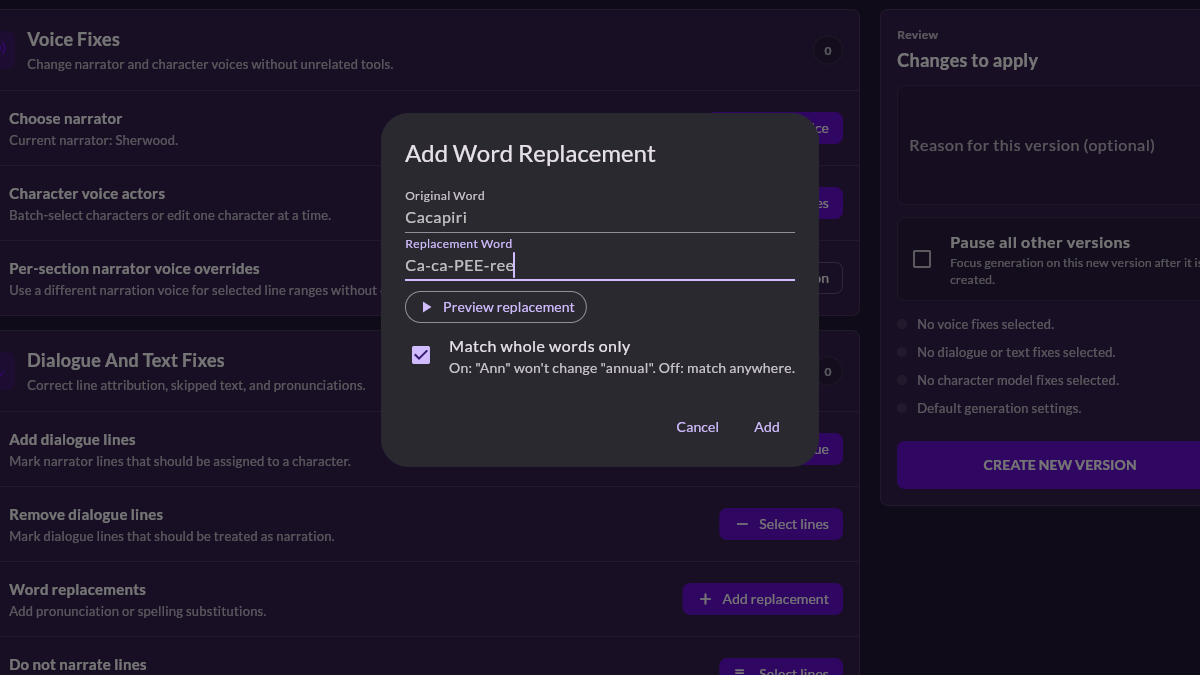
- Enter a speakable respelling in the “say it as” field.
- Use Preview to hear the replacement in the line’s current voice.
- Compare it with Hear original, adjust, and preview again.
- Continue to Review version when it sounds right.
A stressed-syllable respelling such as Ca-ca-PEE-ree for “Cacapiri” can be more useful to a speech engine than a dictionary definition. The replacement is applied as a whole word by default, so a short name should not silently change the middle of an unrelated longer word.
The review screen estimates where the selected word appears in the current audio. It starts the new version at the selected chapter by default. If the same word occurs earlier, you can choose Fix from Chapter 1. Review the replacement and regeneration boundary before creating the version.
Correct the speaker, not the text
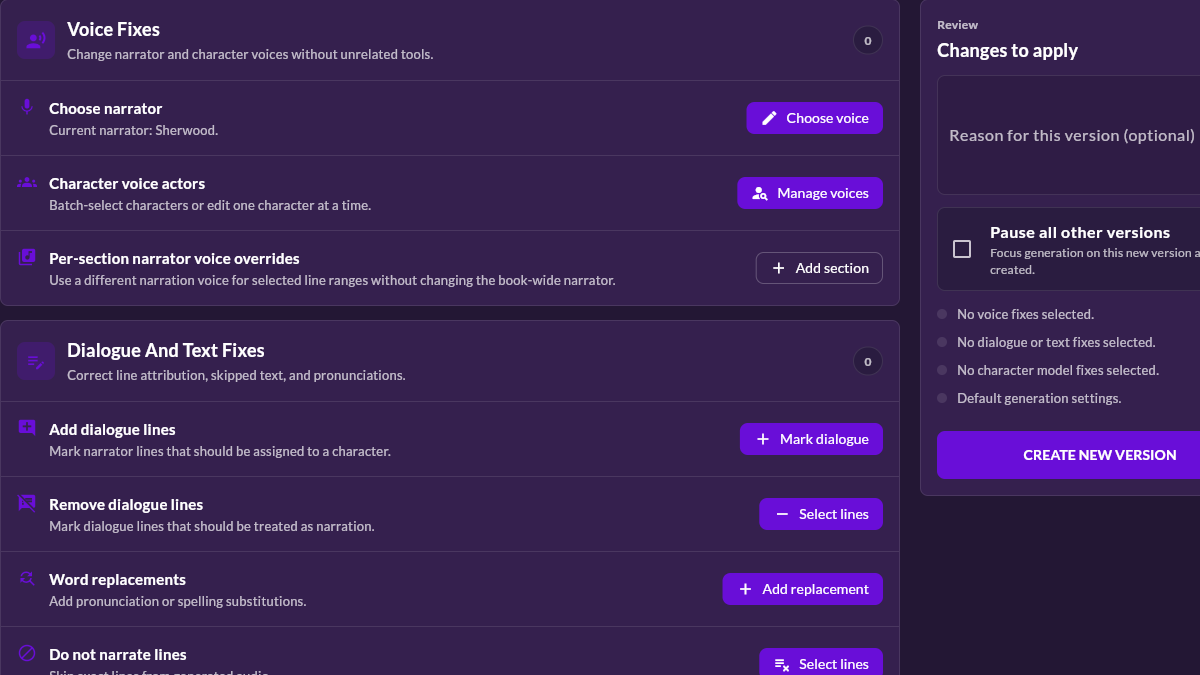
When the words are correct but the speaker is not, use the Dialogue and Text Fixes group in Create Version. You can assign a character to a line that was treated as narration, remove a mistaken dialogue assignment so the narrator reads it, or mark a specific line not to be narrated.
Review nearby lines before making the change. In a fast exchange, the visible mistake may be the result of an earlier ambiguous attribution. Correcting the precise line keeps the scope clear and makes the new version easier to compare with the original.
Change a character or narrator voice
If the right character is speaking with the wrong sound, use Voice Fixes. Create Version can change the book narrator or directly assign a different available voice actor to a character. Narrator choices and character voices remain constrained by the book’s language, accent, account access, and current voice availability.
Ultimate and Admin accounts can also assign a different narrator to a particular section when the book needs a localized narration change rather than a new narrator everywhere.
For an important recurring character, sample more than one scene before switching. A voice that works in quiet dialogue may not fit the same character in an argument or a long monologue. Voice continuity matters too: a correction should improve later chapters without making the same character sound unrelated from one version to another.
You can create a reusable voice from an authorized sample when the standard roster does not fit the role. Read our guide to custom voice actors for full-cast audiobooks before recording or uploading one.
Repair character-model problems carefully
Character Model Fixes cover deeper structural changes: merging duplicate identities, changing age or gender information used for casting, and choosing whether a character’s lines should be read as narration instead of with a distinct character voice. These controls are useful when the first-pass character map misunderstood an alias or description.
A merge has broader consequences than a single dialogue correction because it can affect many lines and voice assignments. Check the Changes to apply panel, note the affected characters, and regenerate a small representative range first when possible.
Adjust character pacing
Create Version also supports per-character narration speed. This is useful when one character consistently feels too rushed or too slow while the rest of the cast sounds right. The setting applies to that character’s generated voice without forcing every character who shares the underlying voice to use the same speed.
Use modest adjustments and evaluate a complete exchange. Extreme speed changes can solve a timing preference while creating a less natural performance.
Choose the regeneration boundary
A targeted correction still produces a new audio version. For pronunciation fixes, the selected chapter is the default starting point; you can start from Chapter 1 when earlier occurrences also need the change. Other version changes likewise let you choose an appropriate starting chapter.
This boundary is what makes “without starting over” practical. Earlier chapters can keep their existing audio when they are outside the chosen range, and reusable chunks within regenerated chapters do not need to be synthesized again. However, a changed voice or character model may affect more lines than a single word replacement, so do not choose an artificially narrow range just to save time.
Review before selecting the corrected version
After generation, compare the same scene in both versions. Confirm that:
- The original problem is gone.
- The correction did not alter unrelated words or speakers.
- The character voice remains consistent through the regenerated range.
- Chapter transitions still sound natural.
- The selected version is the one you intend to use for listening.
Keep a short note in the version reason so you can recognize the change later. A label such as “Correct Elena pronunciation from Chapter 4” is more useful than “test” when several versions exist.
A better first pass makes later fixes smaller
Clean chapter structure, readable dialogue punctuation, and deliberate casting reduce repair work. If you are preparing a new project, our full-cast AI audiobook generator guide explains how to set up the source and review the first generation.
If your account includes Create Version, fix an AI audiobook in MyNarratorAI by reviewing an existing book and creating a corrected version.
Frequently asked questions
Can I replace only one word in an existing audio file?
No. A pronunciation correction creates a new version and regenerates a chapter range. The platform can reuse unchanged audio chunks, but it does not splice one word destructively into the old file.
Can I preview a pronunciation before regenerating?
Yes. You can compare the original line with a respelled preview in the current voice, then replay the proposed fix from Create Version before submitting it.
Will changing one character’s speed affect other characters?
No. The current per-character speed control applies to the selected character, even when another character originally shared the same underlying voice.
Related articles
- AI Audiobook Generator: Turn Any Book Into Full-Cast Audio
- Create Custom Voice Actors for Full-Cast AI Audiobooks
- EPUB to Audio: Complete Conversion Guide
Published on August 23, 2026.